
ScanScan(白描) - OCR Text Grabber, Document Scanner3.1.8 - Get APK
You'll be able to download in few seconds.
Publisher Description
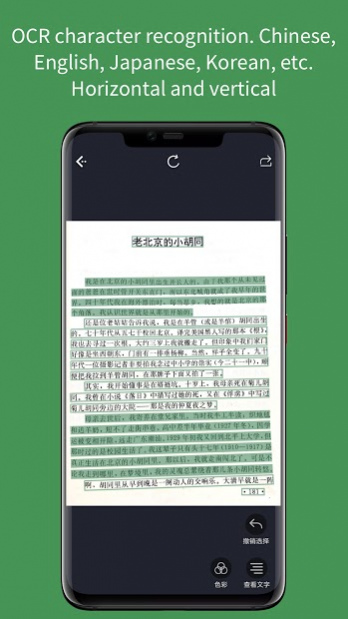
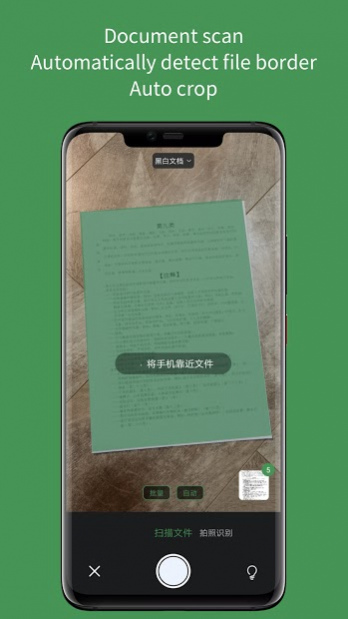
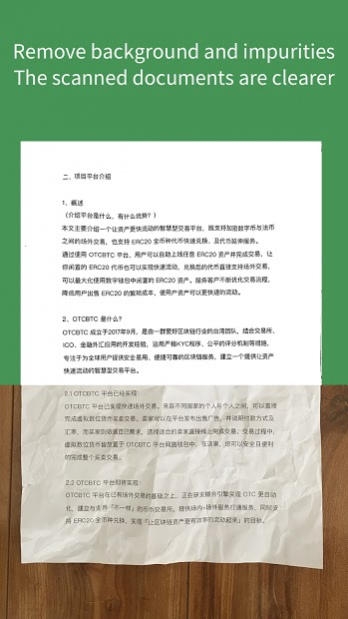

ScanScan(白描) is a high accurate and efficient OCR text recognition and document scanning App. It has high recognition accuracy, faster speed, clean scanning effect and can generate PDF.
Usage scenarios:
Translate text on image, pick text on image, make reading notes, paper documents to electronic files, identification of identity cards and so on.
Main features:
● Batch process.
Leaders of the same area, handle 50 pictures at a time for text recognition and document scanning.
● Form recognition, recognize form image to .xls files, which can be continue edited in Excel or Numbers.
● Freely export and edit the recognition results.
● The recognition result is automatically saved as a historical record and easy to search.
● Translation after recognition
Support the translation of simplified Chinese, Japanese, English, Korean, French, Spanish, Arabic, Russian, German, Portuguese, Italian, traditional Chinese, Cantonese and classical Chinese.
● Multilingual recognition
Support the recognition of Chinese, English, Japanese, Korean, French, German, Russian and Spanish.
● Automatic detect document boundaries for document scanning, with a variety of document colors to choose.
● Automatically continuous document scanning and generate PDF.
● Flexible select text.
● Proofreading for result and original image.
● Restore the original paragraph.
Privacy policy:https://baimiao.uzero.cn/baimiaoprivacy.html
About ScanScan(白描) - OCR Text Grabber, Document Scanner
The company that develops ScanScan(白描) - OCR Text Grabber, Document Scanner is Xinle Tao. The latest version released by its developer is 3.1.8.
To install ScanScan(白描) - OCR Text Grabber, Document Scanner on your Android device, just click the green Continue To App button above to start the installation process. The app is listed on our website since 2021-06-18 and was downloaded 0 times. We have already checked if the download link is safe, however for your own protection we recommend that you scan the downloaded app with your antivirus. Your antivirus may detect the ScanScan(白描) - OCR Text Grabber, Document Scanner as malware as malware if the download link to com.uzero.baimiaog is broken.
How to install ScanScan(白描) - OCR Text Grabber, Document Scanner on your Android device:
- Click on the Continue To App button on our website. This will redirect you to Google Play.
- Once the ScanScan(白描) - OCR Text Grabber, Document Scanner is shown in the Google Play listing of your Android device, you can start its download and installation. Tap on the Install button located below the search bar and to the right of the app icon.
- A pop-up window with the permissions required by ScanScan(白描) - OCR Text Grabber, Document Scanner will be shown. Click on Accept to continue the process.
- ScanScan(白描) - OCR Text Grabber, Document Scanner will be downloaded onto your device, displaying a progress. Once the download completes, the installation will start and you'll get a notification after the installation is finished.
Program Details
System requirements
Download information
Pricing
Version History
version 3.1.8
posted on 2021-06-18
Fix the issue that files can't share
version 3.1.6
posted on 2021-04-07
Fix some issues
version 3.1.2
posted on 2021-03-02
OCR识别准确度优化
version 3.1.0
posted on 2021-01-11
表格识别大提升!支持没有线框的表格的识别,支持一个图片中多个表格的识别,多个表格会识别为一个 Excel 文件的多个工作表 (Sheet) ,如果在默认的 Sheet 中没有看到需要的结果,请切换 Sheet 查看
version 2.9.8
posted on 2020-08-03
提升手写文字的OCR识别准确度,如需识别手写文字,在识别页面顶部选择“手写文字”即可,如需识别日文、韩文、德文等其他国家文字,可选择“自动检测语言”,默认为“中文/英文”识别中英文。
version 2.9.7
posted on 2020-07-15
- 优化OCR文字识别后,部分设备选择文字不流畅的问题
- 修复在批量处理页面替换图片时可能会替换错误的问题
- 修复进入裁剪页面时裁剪框的点可能会挤在一起无法拖动的问题
version 2.9.6
posted on 2020-07-06
- 优化体积过大的图片的色彩处理速度
- 修复部分长图进行OCR识别时可能会闪退的问题
Disclaimer
External Download
We do not host ScanScan(白描) - OCR Text Grabber, Document Scanner on our servers. We did not scan it for viruses, adware, spyware or other type of malware. This app is hosted by Galad and passed their terms and conditions to be listed there. We recommend caution when installing it.
The APK Download link for ScanScan(白描) - OCR Text Grabber, Document Scanner is provided to you by apps112.com without any warranties, representations or guarantees of any kind, so access it at your own risk.
If you have questions regarding this particular app contact the publisher directly. For questions about the functionalities of apps112.com contact us.
